Getting Started on the Mobile App
Setting up the mobile app takes about as long as installing anything else, and the part worth thinking about is what happens in the first fifteen minutes afterwards. Install, sign in, apply a filter, open one listing and send a handful of messages — that is the whole path. Get it right and a light habit of 8 messages a day stays around 240 messages a month rather than quietly becoming something three times larger.

Key takeaways
- There are three install routes: the iOS app listed as CrushMash, an Android package download, and the browser version of the same platform.
- Sign in before browsing if you intend to keep anything, because conversation continuity depends on your own account rather than the device.
- The filter row is the first setting worth touching: the platform shows Unfiltered, Filtered and 18+ options plus a gender filter.
- Decide your message budget up front. 8 a day is 240 a month, 30 a day is 900 and 90 a day is 2,700.
Which install route to pick
iPhone users have the most direct path: the platform's iOS app is listed on the App Store as CrushMash. Installing from the store means updates arrive through the normal channel and the app sits alongside everything else on the home screen, which is convenient and also the reason a notification check is worth doing in the first week.
Android users install from the package the site provides rather than a store listing, so the first thing to decide is where the download lives on your device and whether you are comfortable managing that file yourself. Browsers remain the third route and are the simplest for anyone who does not want a persistent icon. The trade is convenience against friction: the app is faster to open, the browser leaves less behind on the device.
Whichever route you take, the account is the same. Signing in means your threads and their context follow you between phone, tablet and desktop, so a session started at a desk can continue on a train. That portability is the main argument for creating an account early rather than browsing as a guest and starting over later.
The browser route deserves a longer look than it usually gets. It works on a phone, a tablet and a computer with a single sign-in, it uses no storage, and it does not add an icon that invites a tap whenever the phone is idle. The app's advantages are opening speed and notification delivery, and neither is decisive on its own. The honest test is a week with each: install the app first, then try a browser-only week, and compare how many sessions each produced. Illustratively, the gap between two sessions and six sessions a week is the difference between roughly 60 and 180 minutes a month.
The first fifteen minutes
Open Characters and apply one filter rather than three. A single narrow filter produces a shortlist you can actually read; stacking filters usually returns a list of four and the temptation to settle for the first. Then open one listing and read its description as a statement of tone, because that is what it is.
Send five messages and stop. The point of the first session is calibration, not depth: five messages reveal the register, the reply length and whether the pacing suits you. Only then is it worth deciding whether the listing deserves a longer visit tomorrow, when the memory of the thread will make the second session different from the first.
| Step | What you do | What to check |
|---|---|---|
| Install | App Store listing or the Android package, or stay in the browser | Where updates and notifications will come from |
| Sign in | Create the account you will keep | Whether threads follow you across devices |
| Filter | Apply one filter from the row, plus gender if useful | Shortlist length and tag relevance |
| First listing | Read the description before sending anything | Whether the promised register matches the replies |
| Calibration | Send five messages, then stop | Reply length and pacing you can sustain |
Worked example
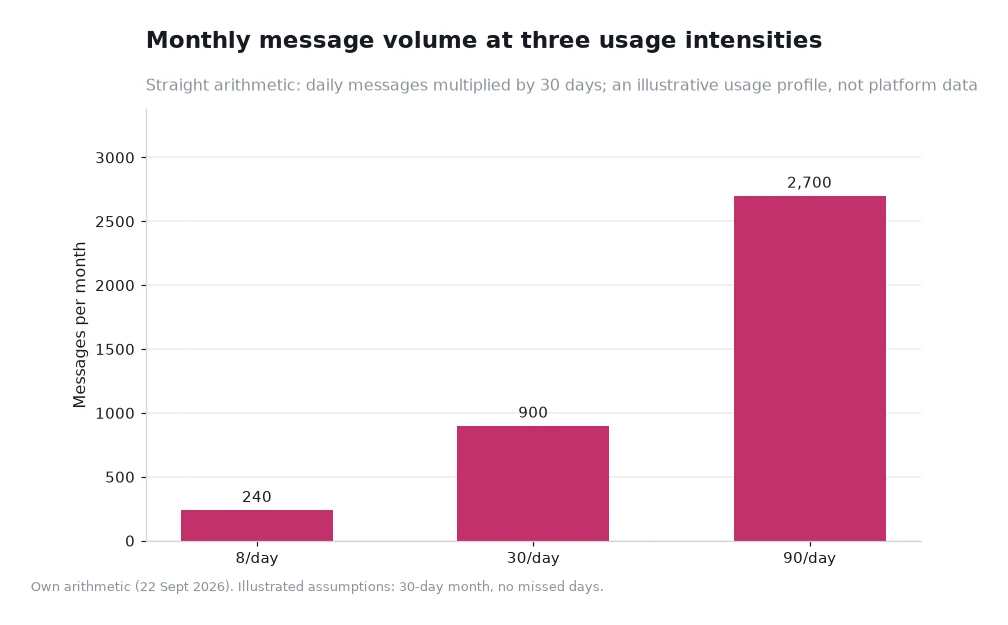
The reason to set a budget in the first week is that message volume is easy to underestimate. Using the illustrative profile charted below, with a 30-day month and no missed days: 8 messages a day becomes 240 in a month, 30 a day becomes 900, and 90 a day becomes 2,700.
Translate that into sessions, assuming about 30 messages per session. The light profile of 240 messages is roughly 8 sessions a month, or two a week. The regular 900 is about 30 sessions a month, close to one a day. The heavy 2,700 is around 90 sessions, which is three a day and only realistic for someone who treats short bursts as the format.
The comparison shows why the phone is the device that changes habits fastest. A desktop session has a natural boundary — you sit down, you finish, you close it. A phone does not, so the same 8 messages a day can be spread over six moments or concentrated into one. Deciding which of those you want is the real first-run setting.
Two settings worth revisiting
The first is notifications. They are useful in the first week because they confirm the app is working, and less useful afterwards because they turn a considered habit into a reflexive one. The second is the filter row: a filter you chose while exploring is often not the filter you would choose now, and re-reading the row once a month keeps the shortlist honest.
When you are ready to look wider, the character search view exposes the popular tags directly, and the AI chat blog carries the platform's own walkthroughs of features as they change. Anyone who wants the fuller description of what the app is for can read it on the porn ai chat page, where the Crushon Porn Chat AI copy sets out the platform's claims about customisable characters, adaptive responses and a private and secure environment in one place. That is a better orientation than a store description, because it comes from the operator rather than a summary.
Frequently asked questions
Is the app the same as the website?
Yes in substance. The account carries your threads either way, and the difference is convenience rather than capability.
What should I do in the first session?
Install, sign in, apply one filter, read one description and send about five messages. Calibration is the goal, not depth.
How many messages a month is normal?
There is no norm, but the arithmetic helps: 8 a day is 240 a month, 30 a day is 900. Pick the figure you would be comfortable explaining and work backwards from it.
Set it up once, then leave it alone
Install from the route that suits your device, sign in, and spend your first session on a single listing rather than a dozen. The setup will take a quarter of an hour and the habit will follow from it.
Then check the arithmetic after a fortnight. If the monthly total is not the one you intended, the fix is in the notification settings and the filter row, not in a new app. Readers must be 18 or older.
Data and sources: platform navigation, filter wording, app references and policy statements read on 22 Sept 2026[1]. Message volumes, session counts and the fortnightly check are illustrative assumptions rather than platform figures. Content is AI-generated text and depicts no real person. Adults 18+ only.